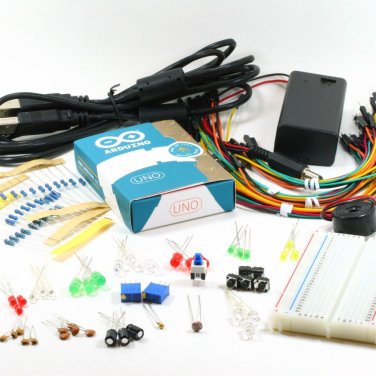
Arduino Uno Starter KitTerrific value starter kit. Compare with the alternatives. OddWires offers more value, high quality components and a great way into all the fun and creativity that's made possible by Arduino. Note that the Arduino packaging has recently changed. You may receive either the packaging shown in the main picture or in the individual Uno image. Over 125 items enabling you to perform a great range of tutorials form the Arduino site (see below).Includes:Arduino Uno - the latest version to power your projects (R3)USB cable400 point breadboard for rapid prototyping without solderingPerfect premium jumper wire pack - combinations female/male, male/male, female/female in 6"/10" lengths (40 wires)3 x 3 mm red LEDs3 x 3 mm yellow LEDs3 x 3 mm ultra-bright blue LEDs3 x 3 mm green LEDs3 x 5 mm red LEDs3 x 5 mm green LEDs3 x 5 mm ultra-bright blue LEDs3 x 5 mm ultra-bright white LEDs5 x Tactile switches5 x 22pF ceramic disc capacitors5 x .1uF ceramic disc capacitors3 100uF electrolytic capacitorsLatching on/off switch9V battery case with 2.1mm plug for Arduino2 x high quality cermet type 10K ohm trimmer potentiometers10 220 ohm resistors10 10K resistors10 1K resistors5 2N2222 transistorsLight dependent resistor (CdS cell)ThermistorPiezo buzzerTutorialsHere is a comparison of oddWires Starter Kits and links to the Arduino tutorials. You can see that even the basic kit enables you to do a lot. But the real fun starts with the Pro which adds a whole bunch of fun with a 433 MHz transmitter/receiver module,LCD Display, Real Time Clock Module, TSOP4838 Infrared Receiver, TSAL4700 Infrared LED, Phototransistor and RGB LED.Then the Deluxe adds the stepper motor & motor controller and the metal gear servo for all those exciting active projects. 1.BasicsStarterProDeluxeBareMinimum: The bare minimum of code needed to start an Arduino sketch.✓✓✓Blink: Turn an LED on and off.✓✓✓DigitalReadSerial: Read a switch, print the state out to the Arduino Serial Monitor.✓✓✓AnalogReadSerial: Read a potentiometer, print it's state out to the Arduino Serial Monitor.✓✓✓Fade: Demonstrates the use of analog output to fade an LED.✓✓✓ReadAnalogVoltage : Reads an analog input and prints the voltage to the serial monitor2.DigitalBlink Without Delay: blinking an LED without using the delay() function.✓✓✓Button: use a pushbutton to control an LED.✓✓✓Debounce: read a pushbutton, filtering noise.✓✓✓Button State Change: counting the number of button pushes.✓✓✓Input Pullup Serial: Demonstrates the use of INPUT_PULLUP with pinMode().✓✓✓Tone: play a melody with a Piezo speaker.✓✓✓Pitch follower: play a pitch on a piezo speaker depending on an analog input.✓✓✓3.AnalogAnalogInOutSerial: read an analog input pin, map the result, and then use that data to dim or brighten an LED.✓✓✓Analog Input: use a potentiometer to control the blinking of an LED.✓✓✓AnalogWriteMega: fade 12 LEDs on and off, one by one, using an Arduino Mega board.✓✓✓Calibration: define a maximum and minimum for expected analog sensor values.✓✓✓Fading: use an analog output (PWM pin) to fade an LED.✓✓✓Smoothing: smooth multiple readings of an analog input.✓✓✓4.CommunicationThese examples include code that allows the Arduino to talk to Processing sketches running on the computer. For more information or to download Processing, see processing.org.ReadASCIIString: parse a comma-separated string of ints to fade an LED✗✓✓ASCII Table: demonstrates Arduino's advanced serial output functions.✓✓✓Dimmer: move the mouse to change the brightness of an LED.✓✓✓Graph: send data to the computer and graph it in Processing.✓✓✓Physical Pixel: turn a LED on and off by sending data to your Arduino from Processing or Max/MSP.✓✓✓Virtual Color Mixer: send multiple variables from Arduino to your computer and read them in Processing or Max/MSP.✓✓✓Serial Call Response: send multiple vairables using a call-and-response (handshaking) method.✓✓✓Serial Call Response ASCII: send multiple variables using a call-and-response (handshaking) method, and ASCII-encode the values before sending.✓✓✓SerialEvent: Demonstrates the use of SerialEvent().✓✓✓Serial input (Switch (case) Statement): how to take different actions based on characters received by the serial port.✓✓✓5.Control StructuresIf Statement (Conditional): how to use an if statement to change output conditions based on changing input conditions.✓✓✓For Loop: controlling multiple LEDs with a for loop and.✓✓✓Array: a variation on the For Loop example that demonstrates how to use an array.✓✓✓While Loop: how to use a while loop to calibrate a sensor while a button is being read.✓✓✓Switch Case: how to choose between a discrete number of values. Equivalent to multiple If statements. This example shows how to divide a sensor's range into a set of four bands and to take four different actions depending on which band the result is in.✓✓✓Switch Case 2: a second switch-case example, showing how to take different actions based in characters received in the serial port.✓✓✓6.SensorsPing: detecting objects with an ultrasonic range finder.✗✓✓7.DisplayExamples of basic display controlLED Bar Graph: how to make an LED bar graph.✓✓✓8.StringsStringAdditionOperator: add strings together in a variety of ways.✓✓✓StringAppendOperator: append data to strings.✓✓✓StringCaseChanges: change the case of a string.✓✓✓StringCharacters: get/set the value of a specific character in a string.✓✓✓StringComparisonOperators: compare strings alphabetically.✓✓✓StringConstructors: how to initialize string objects.✓✓✓StringIndexOf: look for the first/last instance of a character in a string.✓✓✓StringLength & StringLengthTrim: get and trim the length of a string.✓✓✓StringReplace: replace individual characters in a string.✓✓✓StringStartsWithEndsWith: check which characters/substrings a given string starts or ends with.✓✓✓StringSubstring: look for "phrases" within a given string.✓✓✓LiquidCrystal LibraryHello World: displays "hello world!" and the seconds since reset.✗✓✓Blink: control of the block-style cursor.✗✓✓Cursor: control of the underscore-style cursor.✗✓✓Display: quickly blank the display without losing what's on it.✗✓✓TextDirection: control which way text flows from the cursor.✗✓✓Scroll: scroll text left and right.✗✓✓Serial input: accepts serial input, displays it.✗✓✓SetCursor: set the cursor position.✗✓✓Autoscroll: shift text right and left.Servo LibraryKnob: control the shaft of a servo motor by turning a potentiometer.✗✗✓Sweep: sweeps the shaft of a servo motor back and forth.✗✗✓Stepper LibraryMotor Knob: control a highly accurate stepper motor using a potentiometer.✗✗✓OtherArduino Capacitance Meter✓✓✓Arduino Stopwatch✓✓✓